
iCallScreen - Phone Dialer
Contains adsIn-app purchases

star
302K reviews

Everyone
info
10M+
Downloads
Enjoy this app for free, plus many more free of ads and in-app purchases, with a Google Play Pass subscription. Learn more

Everyone
Learn more


About this app
What is iCallScreen - Phone Dialer?
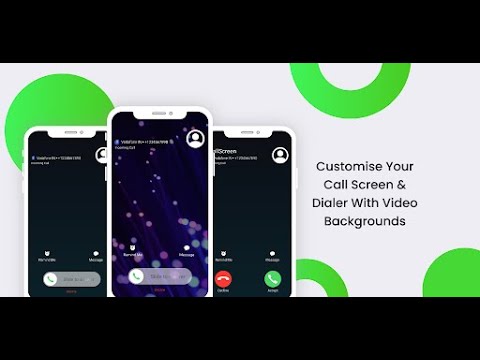
Personalize your Android call screen while keeping contacts, recent calls and dialing tools together. This phone dialer combines a T9 keypad, full-screen caller display and call-management options with backgrounds, ringtones and slide-to-answer controls.
Who is iCallScreen - Phone Dialer for?
It is for people who want their call screen to look different, prefer finding contacts through a T9 dial pad or need favorites and recent calls close at hand. Dual-SIM users can choose a SIM before calling or set a default, while caller announcements and flash alerts offer other ways to notice an incoming call.
What does iCallScreen - Phone Dialer do?
• 🎨 Customize call backgrounds with photos or videos, choose dial-pad colors and use dark mode. Personalize backgrounds and ringtones for individual contacts.
• 📞 Search contacts with the T9 keypad, view contact details, manage favorites and use speed dial. Review recent calls and grouped call logs.
• Slide to answer, or change the accept and decline button styles to suit your call screen.
• 🚫 Block and unblock unwanted callers.
• 🔊 Announce the caller's name or number and adjust flashlight alerts for incoming calls.
• Choose your preferred SIM on a supported dual-SIM phone.
• After a call, use the callback screen to call again, send a message, block the caller or make a note.
• Merge and manage conference calls, with options to separate calls when supported.
• 🎭 Schedule a simulated incoming call with a chosen contact name, number and ringtone.
How does iCallScreen - Phone Dialer work?
Set the app as your default phone app to use its call-handling features. Allow the required call-log access so it can display and manage your call history in the dialer.
Choose your call-screen background, ringtone and answer-button style. Use the dial pad or contacts list to find a person, then place a call. On a dual-SIM device, select the SIM you want or use your chosen default. Your recent calls and callback tools help you follow up afterward.
Compatibility and requirements
The default phone role is required for integrated call handling; call-log access is used for call-history features.
Dual-SIM selection requires a compatible dual-SIM device. Conference merging and separation depend on the calling capabilities available on your device and network. Flash alerts require a phone with a usable flash.
The simulated-call feature creates a fake incoming-call screen; it is not a call from the named person.
The app contains ads and offers in-app purchases.
Privacy
The app may collect and share app information and performance data, along with device or other identifiers.
iCallScreen - Phone Dialer combines a personalized call screen with contact search and practical call controls for your everyday phone use.
iCallScreen - Enjoy the Phone Dialer - Unique Dial Pad on your Android device.
Updated on
Safety starts with understanding how developers collect and share your data. Data privacy and security practices may vary based on your use, region, and age. The developer provided this information and may update it over time.


Ratings and reviews
301K reviews

T
- Flag inappropriate
- Show review history
August 13, 2021
It's a great app but has two major issues. The first one being that the dialer has no sound when you input a number, and the second issue is that the custom call buttons don't show up at all when the phone is locked, which is extremely disappointing. If these two issues get fixed, then I can wholeheartedly recommend this app and will change my score when and if that happens. It's also a bit slow with receiving incoming calls at times. (I have the premium version of this app, but I won't stay subscribed if these three issues above don't get fixed).
1,602 people found this review helpful
ZipoApps
August 19, 2021
We understand how annoying that must be. We're working on a solution. We hope you'll re-consider the rating once we fix the issue.

David Hacker
- Flag inappropriate
- Show review history
July 29, 2024
Trying Free/Basic, Based on its performance, despite some nice features, I would not buy it. Development is paid by adds, I know, but IMO to many adds, from flashing bar and box to full screen video adds and in a phone app, NOT good when trying to make a call, unsure how to : return to a call in progress from another app, record a call or voice mail, unable to change or retain a customization unless connected to data, very slow performance, takes up to 8 seconds to open
41 people found this review helpful
ZipoApps
July 29, 2024
Hi!
We are sorry to hear that the App is not working properly on your end. Please, reach out to our support team at support.icall@zipoapps.com for further assistance. The Premium version has no ads.
Thank you!

Stive Mathew
- Flag inappropriate
July 5, 2026
The calling system which are calling & recieving call is the best. But try to make the messaging system like call & recieve. thank you guys. well done the developer.
87 people found this review helpful
What’s new
- Added Speed Dial Screen
- Improved Design for Contact Details & Settings
- Added Fake Call Feature
- Fixed Call Button Style issue
- Added Option for Change Accept and Decline Call Button style
- Added Call Log Grouping
- Added Flash on Call (Blink Flash Light on Incoming call)
- Bug Fixed
- Improved Performance & User Experience
Everyone
Learn moreApp support
About the developer
NEXTECH AI LTD
support@zipoapps.com
24/1 Mapu
TEL AVIV-JAFFA, 6343423
Israel
+1 856-702-2690


